
Free · No sign-up · No ads
Herringbone pattern maker
Design textured herringbone bracelets and bands with Miyuki Delica color codes. BeadDot keeps the even column count for you, then walks you through every bead pair and needle move while you stitch.
Runs in your browser · Works on phone, tablet and computer
Next pair
- DB-723
- DB-723
Row 9 · bead pair 3/7
Pick up both beads of this pair in order: DB-723, DB-723.
What is herringbone stitch?
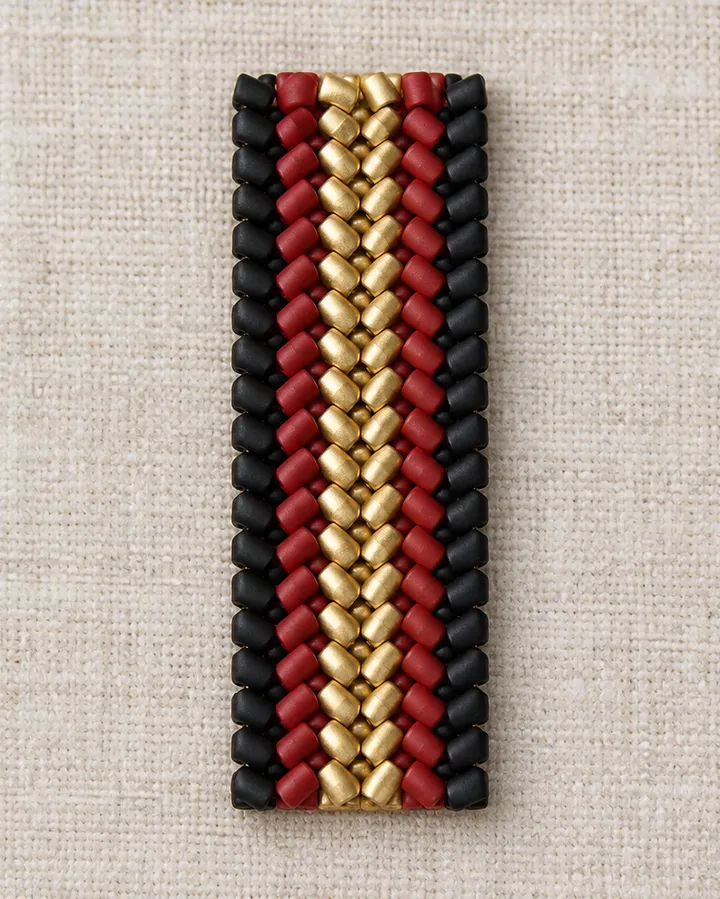
Herringbone is a beadweaving stitch where beads are added two at a time and each pair leans together in a V. It is also known as Ndebele stitch.
The surface is textured and slightly diagonal, and it looks striking even in a single color. Vertical stripes and zigzags work especially well in this stitch.
What to know when designing a herringbone pattern
Use an even number of columns
Every step adds two beads, so the pattern is made of pairs. BeadDot keeps the column count even whenever you resize.
It starts from a ladder stitch base
The first row is a ladder stitch row of beads sewn side by side. The pattern grows on top of it, from the bottom up.
Each row changes direction
At the end of a row you turn at the edge and flip the work; the next row is stitched the other way.
Think in pairs of colors
When both beads of a pair share a color you get straight vertical stripes; shifting a color from pair to pair makes zigzags and diagonals. See the stitch comparison guide for ideas.
What BeadDot does for herringbone
- Keeps the column count even automatically
- Follow mode shows each bead pair with its color codes
- Needle steps for the ladder start, stepping down and edge turns
- Saves your row progress and where you stopped
- Bead count and grams per color
- PNG export
How do I start?
Open a herringbone pattern
The new pattern sheet opens with herringbone selected; pick a size.
Place your colors
Paint with Miyuki Delica codes; keep pairs in one color to build stripes.
Stitch with follow mode
See the next pair and needle move on screen and step through the pattern.
Herringbone questions
What is the difference between herringbone and peyote?
In peyote beads are added one at a time and columns shift by half a bead. In herringbone beads are added in pairs and each pair sits in a V, giving a more textured, flexible fabric.
Why does a herringbone pattern need an even column count?
Each step adds one pair, two beads. An odd column count would leave half a pair, so BeadDot always keeps herringbone patterns at an even number of columns.
Is tubular herringbone supported?
BeadDot currently supports flat herringbone patterns. There is no follow mode for tubular herringbone yet.
Which beads does it work with?
You can design with the Miyuki Delica 11/0 and TOHO Treasure 11/0 color catalogs and see every color’s code and name.
Is the herringbone pattern maker free?
Yes. Designing, follow mode, inventory and cloud storage are free and ad-free.
Draw your first herringbone pattern
The studio opens with herringbone selected; pick a size and start painting.